I just started developing Phase 2 of a custom workflow application, and I'm genuinely excited about this one. It's for a facilities management company that serves a major national brand.
In Phase 1, we built the complete lifecycle for one line of business: Refurbishment. Now that it's humming along, we're expanding into Facilities Maintenance & Management. These lines of business are extremely unique. Other than some shared infrastructure, this is almost a full new build.
But before I write a single line of production code, here's what already exists:
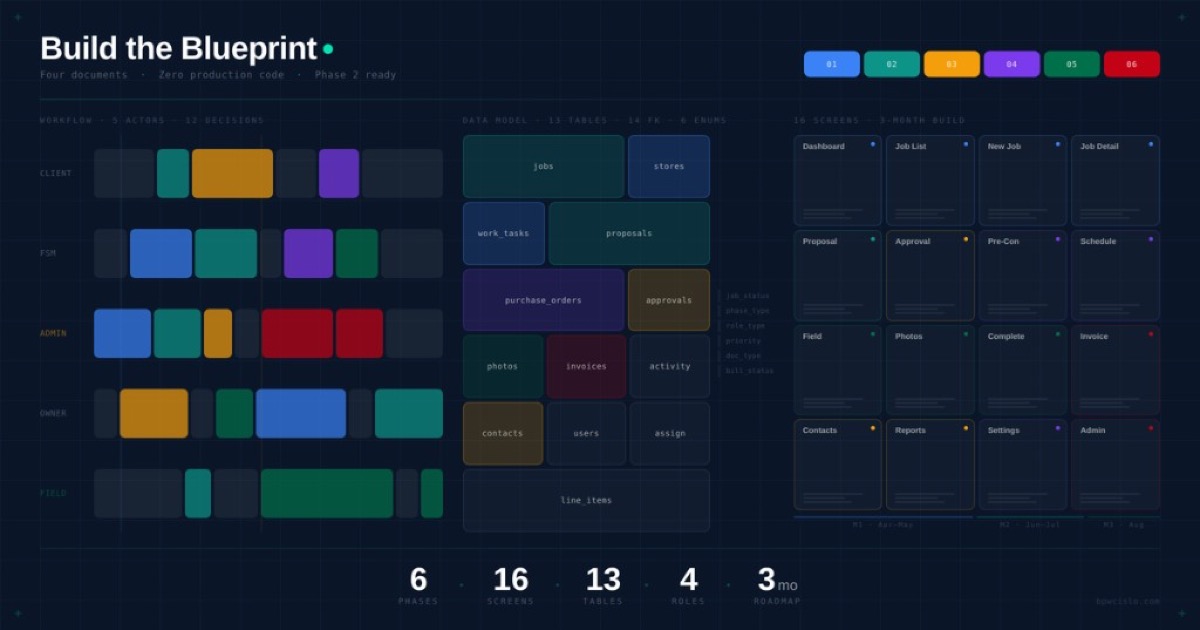
A development scope document that maps a 6-phase job lifecycle: from the moment a work request arrives to the moment the invoice gets paid. Every phase has defined statuses, required fields, and clear handoff points between team members.
A full data model specification: 13 database tables, 6 enum types, 14 foreign key relationships, row-level security policies, all derived from tracing a single real job through the client's actual workflow. Not hypothetical. Not "best practice." Real.
An interactive swim lane diagram showing every actor, every decision point, every handoff across the entire process. The owner, the admin team, the field crew, the client stakeholders, each one mapped to what they do, when, and what triggers the next step.
A screen-by-screen blueprint covering 16 screens across a 3-month build, with wireframes, data connections, role-based access rules, and the specific fields each view needs to display.
Four documents. Zero production code.
That's the point.
6-Phase Job Lifecycle
Every job follows this path: from request to payment
Development scope: 6 phases, 16 screens, 3-month roadmap, all mapped before writing a line of code
Why the Blueprint Comes First
25+ years. 10 startups. Some of them taught me everything I needed to know about what happens when you build before you think. Those lessons became the foundation for how I work today.
Here's what I know for sure: the projects that thrive aren't the ones with the best developers. They're the ones where the thinking happened before the typing.
When the blueprint is clear, development flows. Teams know what they're building, why, and in what order. Questions get answered in a planning doc, not in a code editor at 2am. Scope stays honest because the boundaries were drawn intentionally, not discovered mid-sprint.
That clarity? It's the difference between a three-month build and a nine-month odyssey.
What the Process Actually Looks Like
I sit with the client and trace real jobs through their actual process. Not the idealized version. The living, breathing one: five systems holding pieces of the same truth, proposals threading through inboxes, a billing team that's built impressive workarounds to keep everything moving.
That complexity isn't a problem. It's the raw material. And honestly? It's where I come alive.
Real workflow mapped from Store #9660 Rockaway: every actor, every handoff, every decision point
Then I map that process completely. Every actor. Every decision. Every status change. Every piece of data that needs to exist for the next step to happen.
From that map, I build the data model. Not from a template. From the workflow itself. Every table, every relationship, every enum value comes from something real. If a field exists in the schema, it's because a human being needs it at a specific moment in their day.
Then I design the screens. Each one tied to a specific phase of the workflow, built for the specific role that uses it. The owner sees pricing. The field crew sees instructions and photo capture. The client sees status and documentation. Nobody sees more than they need.
And only then, after the scope is locked, the data model is solid, the screens are mapped, and the timeline is realistic, do I start building.
This Is Where AI Changes the Game
I use AI as a thinking partner throughout this entire process. Not to generate code. To generate clarity.
I describe a client's workflow in plain language and collaborate with AI to produce a data model that accounts for edge cases I might miss on my own. I map a 12-step process across 4 actors and get it reflected back as an interactive diagram the client can actually review and understand. Not a static PDF buried in a drive. A living document.
The planning artifacts for this project? Interactive swim lane diagrams. Color-coded status flows. Wireframes with real data. A database schema with annotations explaining why every field exists. Beautiful, detailed, and functional.
A few years ago, this level of documentation would've taken weeks and cost thousands in billable consulting hours. Now I produce it in days, not because the thinking is faster, but because the translation from thinking to documentation is wildly more efficient.
AI doesn't replace 25 years of knowing which questions to ask. It amplifies the output once I know the answers.
The Real Leverage
Here's what most people get wrong about AI and building:
They use AI to write code faster. That's useful, sure. But speed without direction just gets you to the wrong place quicker.
The real leverage is in the planning. Using AI to think through architecture, map edge cases, stress-test assumptions, and produce documentation so clear that development becomes almost mechanical. By the time I'm coding, there are no mysteries. No "I'll figure it out when I get there." No architectural decisions being made at 2am.
The blueprint IS the product. The code is just construction.
What This Planning Unlocked
For this particular project, here's what that clarity created:
A 3-month development roadmap that both the client and I believe in, because it's built on defined screens, not vague feature descriptions. Month 1 handles the core workflow (receipt through approval). Month 2 builds the execution engine (pre-construction checklists through change orders). Month 3 closes the loop (billing, client portal, archive).
Intentional scope decisions: 7 items explicitly deferred with clear reasoning for each. Construction workflows, vendor management, automated integrations. All acknowledged, all documented, all moved to future phases. Not forgotten. Chosen.
Data Architecture — Entity Relationships
13 tables, 6 enum types, 14 foreign keys, derived from real workflow
store_number text UNIQUEname · address · managerfull_name · email · rolewt_number · source_typestatus · reject_reasonphoto_type · storage_pathcaption · sort_orderaction · old_value · new_valuestatus job_status enum (13 values)billing_path · store_id FKcategory · urgency · metadataversion · total_amountproposal_line_items[]po_number · total_amountpo_line_items[]qb_invoice_id · totalinvoice_line_items[]role owner | admin | field_techEvery table derived from tracing a real job: Store #9660 Rockaway, WT 32760360
A data architecture designed for where the platform is going, not just where it is. JSONB metadata fields for extensibility. Soft deletes everywhere. Timestamp tracking on every record. Row-level security that ensures the field crew never sees pricing and the client never sees margins.
And a client who can look at these documents and see their entire business reflected back: clearly, accurately, and organized in a way that makes the path forward obvious.
Facilities Dashboard
/facilities/dashboard Owner AdminCentral command. Every open job at a glance, filterable by phase, urgency, and assignment.
| Job | Store | Phase | Status |
|---|---|---|---|
| Tile Replace + WOM | #9660 Rockaway | Execution | In Progress |
| Grease Trap Replace | #8812 Wayne | Proposal | To Be Priced |
| HVAC Repair | #9401 Parsippany | Approval | Pending |
Job Detail — Tile Replace + WOM
/facilities/jobs/:id OwnerEverything about a single job. Timeline, photos, proposal, PO, pricing. One view, role-filtered.
Field Crew — Tablet View
/field/jobs/:id Field TechSimplified for on-site use. Instructions, photo capture, checklist. No pricing visible.
Completion Photos
Client Portal — Status View
/portal/jobs/:id Client (FSM)Read-only view for Starbucks stakeholders. Status, documentation, completion photos. No internal pricing or margins.
Documentation
16 screens, 4 user roles, each view shows only what that role needs, when they need it
That clarity? That's what I build.
"I've had the privilege of working with Brian for over 15 years across multiple projects, and he's been an absolute game changer for our business. He's the person I go to when I have an idea that needs to be brought to life, and every time, he delivers beyond expectations.
Brian has elevated our company in ways that are hard to put into words. His insight, creativity, and ability to execute have played a huge role in our growth and continued success. Quite honestly, we wouldn't be where we are today without him.
If you're looking for someone who truly understands how to take a vision and turn it into something real, Brian is the one."
Ryan Nedza, Owner — Associated Restaurant Services
What does your planning process look like before you start building? Whether you're a solo builder, part of a team, or hiring someone to build for you, I'm curious how much of the thinking happens before the typing.
Would love to hear what's working for you.
Grateful for the work and the people it serves.
Your friend in Costa Rica 🌴